
Are you working with Python every day? If yes, then choosing the right Python IDE can completely transform your coding experience. In this blog, you will learn how to create a good developmental environment by choosing the right tools. You can choose the Python IDE that fits your project, is worth your time, and accelerates learning, prototyping, and collaboration.
In this article we are going to describe a few of the most powerful and highly recommended Python IDEs, from a full-featured desktop Python IDE to a lightweight editor with plugins
What is an IDE? Benefits of Choosing the Right IDE for Python:
An IDE is an integrated development environment that bundles code editing, running, debugging, and testing all under one tool. It often includes version control and package management also. Here are the main benefits of using a Python IDE or code editor:
- Faster development due to autocomplete, code navigation, and refactoring features.
- Integrated debugging tools and breakpoints that expose runtime behavior quickly.
- Python IDEs have built-in tools that automatically manage packages, catch errors, and clean up your code, i.e., virtual environments, linters, and formatters.
- A complete project management workflow. from testing to building and deployment.
Top 7 Most Recommended Python IDEs (Desktop and Cloud)
Following is a list of highly recommended Python IDEs, from power-packed professional environments to lightweight editors:
1. PyCharm—The Professional Python IDE
PyCharm is the best Python IDE, which combines deep language support, a powerful debugger, integrated test runners, and intelligent refactoring. It is the best choice for mid-range to advanced codebases, web development projects (Django, Flask), and teams that rely on feature-rich IDEs. Try PyCharm by JetBrains.
2. Visual Studio Code
VS Code is the most widely used code editor that turns into a Python programming IDE after adding the Python extension (ms-python.python) and the Pylance language server.
It is the developer’s favorite due to its high speed, huge library of extensions, built-in terminal, and advanced debugging experience.
3. Jupyter Notebooks / JupyterLab
Jupyter Notebooks are the standard tool for data analysis, creative visualizations, and interactive experimentation. JupyterLab is the more advanced interface that makes it ideal for both online development and local setup for notebooks, code, and rich output.
4. Spyder
Spyder offers a MATLAB-like workflow, including an editor, variable inspector, console, and built-in plotting tools. It is an ideal Python IDE for engineers transitioning their workflow from MATLAB to Python.
5. Thonny
Thonny is the beginner-friendly Python IDE with a clean UI and an easy debugger. It is the perfect tool for learning basic concepts, rapid code prototyping, and testing small code snippets.
Pro Tips for Using Your Python IDE Efficiently
- Use type hints and an advanced language server, such as Pylance or Pyright, for better code analysis.
- Automate code formatting (using Black and isort) and linting (using Flake8/Pylint) in your pre-commit checks and CI process.
- Use debugger features like variable watches and conditional breakpoints for faster troubleshooting.
- Maintain a separate virtual environment for each project, and configure your editor tooling to be project-specific instead of global.
- Try sharing the standard editor configuration along the workspace to avoid unnecessary configuration headaches.
- Exclude large directories (like build artifacts and large datasets) from indexing to improve IDE. Performance.
- Use native debugging tools for better performance.
- Try remote development via VS Code Remote, SSH, or Codespaces to index your project on a more powerful machine close to your repo.
Most Recommended Python IDEs: My Practical Picks for 2026
Here is my personal selection for the Python IDEs across different use cases. These are the tools based on different scenarios:

1. For Professional Development: Try PyCharm Professional (if you can invest) or VS Code with the (Pylance + Python) extension.
2: For Data Sciences: You can go with JupyterLab (local) and Google Colab (cloud).
3: For Fast Speed: Check VS Code or Sublime Text with LSP (Language Server Protocol).
4: For Beginners: Thonny or Replit can be ideal choices for quick learning and prototyping.
5: Online IDEs: Try Google Colab (for machine learning), Replit (for web demos), and GitHub Codespaces (for professional-level remote development).
Try Multiple Python IDEs Quickly
- You can evaluate several Python IDEs efficiently using this approach:
- Pick a small project like running tests, debugging, or refactoring. to use as a benchmark.
- Measure the time taken to complete tasks in each IDE and record friction points.
- Consider the quality of extensions, debugging tools, and the ease of configuration for optimal development.
- Check the total cost of licensing, setup complexity, training, and team adoption.
Set Up a Minimal Python IDE Workflow (VS Code example)
Here is the quick practical setup for setting up VS Code as your Python programming IDE:
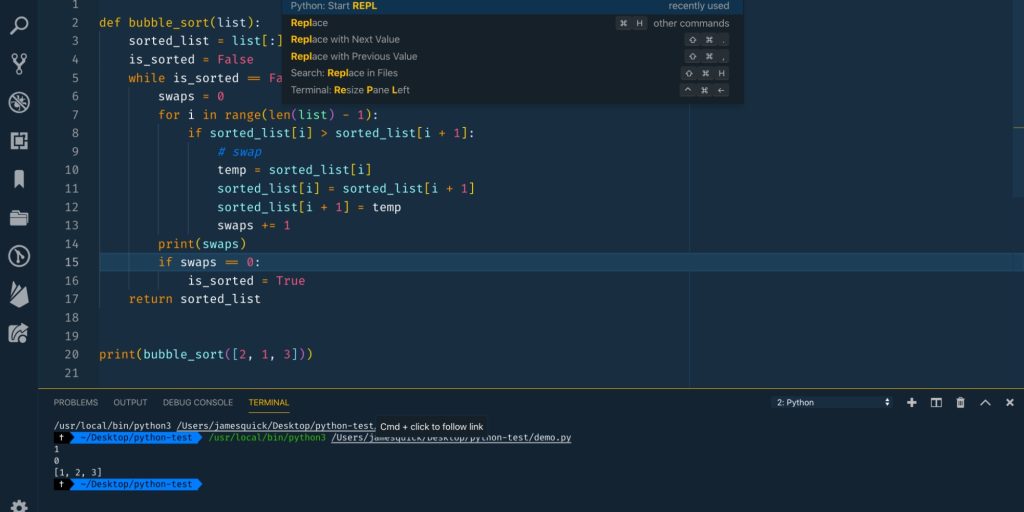
1) Install Python and create a virtual environment:
python3 -m venv .venv
source .venv/bin/activate  # macOS/Linux
.venv\Scripts\activate     # Windows (PowerShell)
2) Open VS Code in the folder and install Python extension and Pylance.
3) Configure the interpreter to use the .venv created above.
def fibonacci(n: int) -> list[int]:
    """Return the first n Fibonacci numbers."""
    if n <= 0:
        return []
    seq = [0, 1]
    while len(seq) < n:
        seq.append(seq[-1] + seq[-2])
    return seq[:n]

if __name__ == "__main__":
    print(fibonacci(10))
4) Add a simple code file and run with the debugger. You can try this Python code:
5) Configure a debug launch and set breakpoints.
Learning Resources and Next Steps
Are you getting serious about learning Python development? Follow a structured path to master both language fundamentals and tooling (includes choosing the right Python IDE for your workflow.)
Check out this comprehensive course, Python Training—Essentials to Start, which covers the basics and practical workflows and aligns with the real IDE setups.
Final Thoughts—Pick the IDE That Amplifies You
When choosing the best Python IDE, there are many strong options, from fully featured to small browser-based tools. The ideal solution will be the one that fits your workflow and maximizes your productivity.
Start by:
- Match the IDE with your basic use case, like web development, scripting, or data science.
- Check two or three of the most recommended options.
- Pick the one that best suits your workflow and enhances productivity.
- Try the systematic training that combines coding skills with practical tools like this course. Python Training—Essentials to Start.
Code smarter! Find the right Python IDE that complements your workflow and lets you create faster, cleaner code.

Early in my career, I specialized in the Python language. Python has been a constant in my professional life for over 10 years now. In 2018, I moved to London where I worked at companies of various sizes as a Python developer for five years. In parallel, I developed my activity as a Mentor, to which I now dedicate myself full-time.